Yii中包括一个内置的错误处理程序。Yii错误处理程序将执行以下操作 -
-
转换所有非致命PHP错误到可捕获异常
-
显示带有详细的调用堆栈的所有错误和异常
-
支持不同的错误格式
-
支持使用一个控制器动作来显示错误
要禁用错误处理,应该在入口脚本中定义 YII_ENABLE_ERROR_HANDLER 常量为 false 。
错误处理程序被注册为一个应用程序组件。
步骤1 - 可以通过以下方式对其进行配置,代码如下所示:
return [
   'components' => [
      'errorHandler' => [
         'maxSourceLines' => 10,
      ],
   ],
];
上述配置设置以便显示源代码的数量为 10 行 。错误处理程序将所有非致命PHP错误到可捕获异常。
第2步 - 添加 actionShowError() 方法到 SiteController。
public function actionShowError() {
   try {
      5/0;
   } catch (ErrorException $e) {
      Yii::warning("Ooops...division by zero.");
   }
   // execution continues...
}
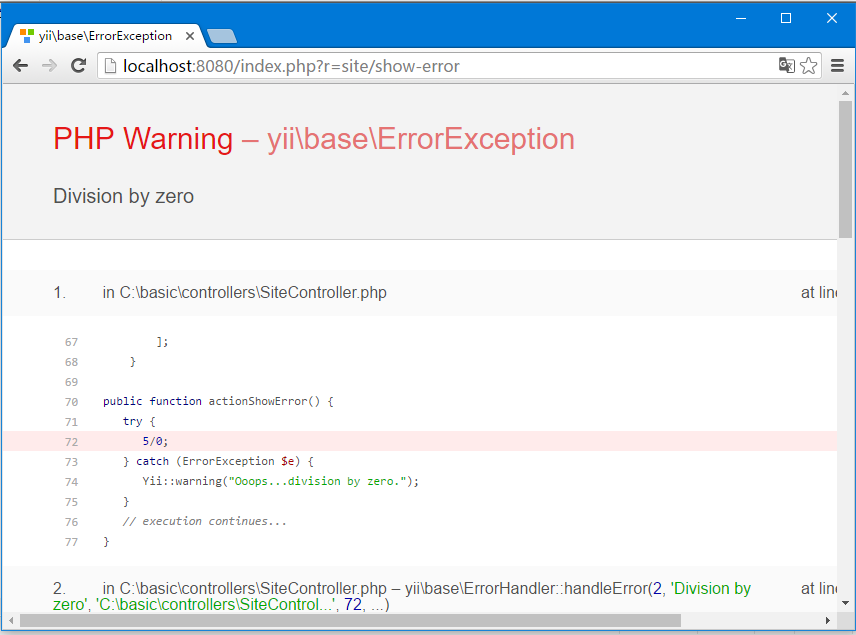
第3步 - 打开URL http://localhost:8080/index.php?r=site/show-error 会看到一个警告消息。
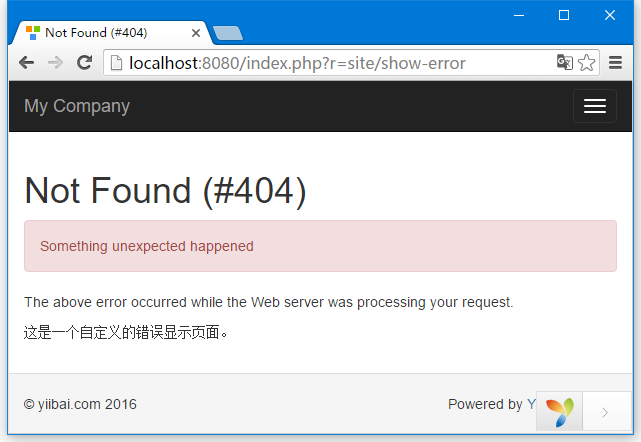
如果想显示给用户说明他的请求是无效的,可以抛出 yii\web\NotFoundHttpException 。
步骤4 - 修改 actionShowError()函数(在 SiteController 中)。
public function actionShowError() {
   throw new NotFoundHttpException("Something unexpected happened");
}

当 YII_DEBUG 常量设置为 true ,错误处理程序将显示详细的调用堆栈的错误。
当常量常量设置为 false ,则仅显示该错误消息。默认情况下,错误处理程序使用这些视图显示错误
-
@yii/views/errorHandler/exception.php − 当调用堆栈信息显示错误时视图文件应该会被使用。
-
@yii/views/errorHandler/error.php − 当在不调用堆栈信息显示错误时视图文件被使用。
也可以使用指定错误处理的动作,以自定义显示错误。
第6步 - 在 config/web.php 文件修改 ErrorHandler 应用程序组件。
<?php
   $params = require(__DIR__ . '/params.php');
   $config = [
      'id' => 'basic',
      'basePath' => dirname(__DIR__),
      'bootstrap' => ['log'],
      'components' => [
         'request' => [
            // !!! insert a secret key in the following (if it is empty) - this
               //is required by cookie validation
            'cookieValidationKey' => 'ymoaYrebZHa8gURuolioHGlK8fLXCKjO',
         ],
         'cache' => [
            'class' => 'yii\caching\FileCache',
         ],
         'user' => [
            'identityClass' => 'app\models\User',
            'enableAutoLogin' => true,
         ], 'errorHandler' => [
            'errorAction' => 'site/error',
         ], //other components...
            'db' => require(__DIR__ . '/db.php'),
      ],
      'modules' => [
         'hello' => [
            'class' => 'app\modules\hello\Hello',
         ],
      ],
      'params' => $params,
   ];
   if (YII_ENV_DEV) {
      // configuration adjustments for 'dev' environment
      $config['bootstrap'][] = 'debug';
      $config['modules']['debug'] = [
         'class' => 'yii\debug\Module',
      ];
      $config['bootstrap'][] = 'gii';
      $config['modules']['gii'] = [
         'class' => 'yii\gii\Module',
      ];
   }
   return $config;
?>
上述结构定义了不调用堆栈来显示错误,site/error 动作将被执行。
第7步 - 修改 SiteController 中的 actions() 方法。
public function actions() {
   return [
      'error' => [
         'class' => 'yii\web\ErrorAction',
      ],
   ];
}
上面的代码定义:当错误发生时,错误(error.php)视图将被渲染。
第8步 - 在 views/site 目录下创建一个 error.php 文件。
<?php
   /* @var $this yii\web\View */
   /* @var $name string */
   /* @var $message string */
   /* @var $exception Exception */
   use yii\helpers\Html;
   $this->title = $name;
?>

<div class = "site-error">
   <h2>customized error</h2>
   <h1><?= Html::encode($this->title) ?></h1>

   <div class = "alert alert-danger">
      <?= nl2br(Html::encode($message)) ?>
   </div>

   <p>
      The above error occurred while the Web server was processing your request.
   </p>

   <p>
      这是一个自定义的错误显示页面。
   </p>
</div>